You know how many jobs you've got on at the moment. Roughly. You could name most of them if someone asked. But could you say, right now, which ones are waiting on materials, which have been scheduled, and which are ready to invoice?
For most fitting companies, the honest answer is: not without checking several places and making a few phone calls.
That's not a criticism. It's the natural result of how fitting businesses grow. You start doing everything yourself, so tracking is just remembering. You take on a fitter or two, so tracking becomes texting and talking. You get busier, and suddenly there's no system - just a collection of habits that mostly work until they don't.
This post is about what "tracking jobs properly" actually means, and what it looks like when you get it right.
What you're actually trying to track
Before talking about systems, it's worth being specific about what information matters. A window fitting job has a lifecycle, and at each stage you need to know different things:
- Enquiry. Someone's interested. You need their contact details, what they're after, and a reminder to follow up if you don't hear back.
- Survey/quote. You've visited, measured up, and sent a price. You need to know when the quote went out, what it included, and when to chase.
- Awaiting materials. Job's confirmed but you're waiting on glass, frames, or hardware. You need to know what's outstanding and when it's due.
- Scheduled. Materials are in, fitters are booked. You need to know who's going, when, and for how long.
- In progress. Work's happening. You need updates from site, photos, and visibility of any issues.
- Complete. Job's done. You need sign-off, final photos, FENSA notification, and invoice raised.
That's six distinct stages, each with different information needs. Most fitters track some of this, some of the time, in some fashion. The gaps are where jobs fall through the cracks.
Why spreadsheets stop working
The spreadsheet is the first attempt at proper tracking for most growing fitting companies. You create a sheet with columns for customer name, address, job type, status, and maybe a notes field. It feels organised. For a while, it works.
Then reality sets in.
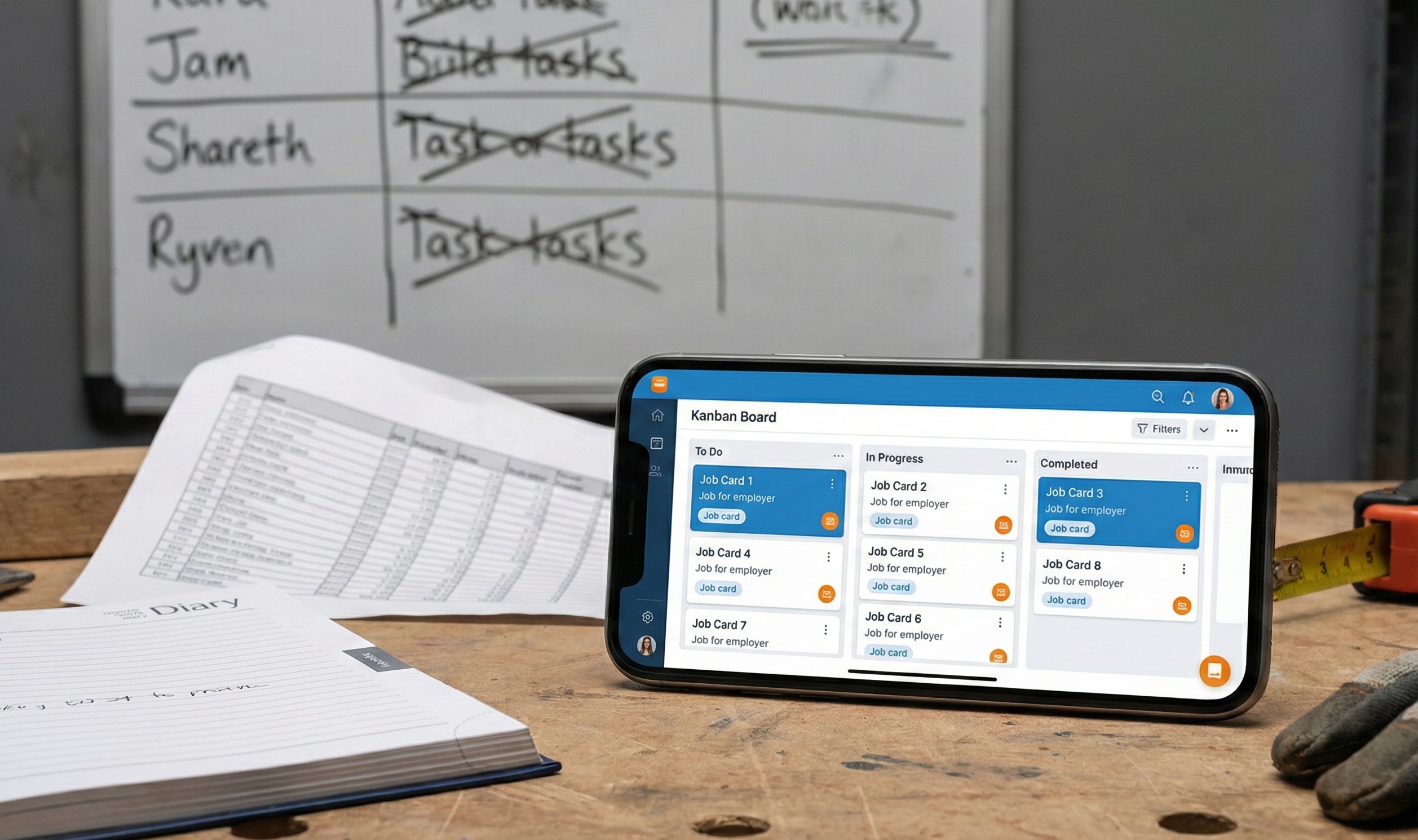
The spreadsheet lives on one computer, or maybe in Google Drive. Either way, your fitters can't easily update it from site. So updates happen at the end of the day, or when someone remembers, or not at all. By midweek, the spreadsheet says one thing and reality says another.
Notes pile up in a single cell, becoming unreadable. There's no good way to attach photos. You can't see the job's history - just its current state. Filtering and sorting helps, but you're still looking at rows of text, not a picture of what's actually happening across the business.
Spreadsheets are great for data. They're terrible for workflows. And job tracking is fundamentally about workflow: what needs to happen next, for which jobs, and who's responsible.
The whiteboard and wall calendar trap
Some companies go physical instead: a whiteboard with job names and statuses, a wall calendar for scheduling, maybe a filing system for paperwork.
The whiteboard has the same fundamental problem as the spreadsheet: it only works if someone updates it, and your fitters aren't in the office to do that. It becomes a record of what was true yesterday morning, not what's true now.
Worse, it's not portable. When you're on the phone with a customer asking about their job, you can't see the whiteboard from your van. When a fitter needs to know what's happening with their next job, they can't check the wall from site.
Physical systems feel tangible and trustworthy. But they anchor your information to a location, and your business doesn't stay in one location.
What proper job tracking actually looks like
Effective job tracking has four characteristics. If your current system doesn't have all four, you're working harder than you need to.
- One source of truth. There's one place where jobs live. Not a spreadsheet plus a calendar plus WhatsApp. One system that everyone uses and everyone trusts. If it's not in the system, the job doesn't exist.
- Accessible from anywhere. Your fitters can see their jobs from the van. You can check status from home. The office can see everything. No one's locked out because they're not in the right place.
- Updated in real time. When a fitter marks a job complete, you see it immediately. When you reschedule, the fitter sees it immediately. No lag, no "I didn't get the message," no out-of-date information.
- Everything attached to the job. Notes, photos, schedule, customer details, invoice status - it's all in one place. You don't have to cross-reference three different systems to understand what's happening with a job.
That's it. Not complicated in theory. But it requires the right tool.
How FitterPal tracks jobs
In FitterPal, every job is a container that holds everything related to that piece of work.
You create a job when an enquiry comes in. It starts in your pipeline, visible on a board view where you can see all your jobs organised by stage: enquiries, quotes sent, awaiting materials, scheduled, in progress, complete. Drag a job from one column to another as it progresses. At a glance, you see the shape of your business - what's in the pipeline, what's scheduled, what's generating revenue.
Each job holds the customer's details, the job description, any notes from the survey, photos taken before, during and after, the schedule (who's going when), updates from the team, and invoice status. Everything's in one place. When you open a job, you see its entire history and current state.
Your fitters see their assigned jobs on their phone. They can check the details before they leave, add updates from site, upload photos as they work, and mark the job complete when they're done. No phone calls to the office asking "what's the address again?" No texting photos that disappear into chat threads.
You see everything updating in real time. A fitter marks a job in progress, you see it. They add a note about a problem, you see it. They upload completion photos, you see them. The system is the communication channel.
The questions you stop asking
Here's how you know job tracking is working: the repetitive questions disappear.
"What's happening with the Henderson job?" You look at the board. It's in the "awaiting materials" column. Note says glass due Thursday.
"Did we ever invoice the Maple Avenue job?" You open the job. Invoice raised, marked as paid.
"Who's at the Patels' today?" You check the schedule. Dave, started at 8am, marked the job in progress at 8:15.
"What did we agree about the trickle vents?" You open the job and read the survey notes.
Each of these questions used to require a phone call, a text, a rummage through emails, or someone to physically check a wall calendar. Now they take seconds, and you don't have to bother anyone else.
The time saved is significant. But the real benefit is headspace. When you're not holding job statuses in your memory, that mental capacity is freed up for actual work.
Getting your team to actually use it
The best system in the world is useless if your fitters don't update it. This is the fear that stops a lot of fitting companies from moving beyond spreadsheets: "my lads won't use it."
Here's the thing: fitters don't resist systems. They resist hassle. If updating a job means logging into a desktop app, navigating through menus, and typing notes on a full keyboard, they won't do it. Too much friction.
If updating a job means tapping the job on their phone and pressing "mark complete" or snapping a photo that uploads automatically, that's not hassle. That's two taps. Less effort than texting the office.
FitterPal is built for mobile because that's where fitters are. The app is designed for blokes on site with dirty hands and five minutes between tasks. Big buttons, simple flows, minimal typing. The system works with how fitters actually work, not against it.
The transition isn't about forcing adoption. It's about making the right thing easier than the wrong thing.
What you should be able to answer instantly
Here's a test. If you can answer these questions in under thirty seconds without making a phone call, your job tracking is working:
How many jobs are currently in progress?
Which quotes have been outstanding for more than a week?
What's scheduled for each fitter tomorrow?
Which completed jobs haven't been invoiced yet?
What materials are outstanding for confirmed jobs?
If you can't answer those questions quickly, you don't have visibility. You're running your business on memory and hope. That works until it doesn't - usually when you're at your busiest and can least afford things falling through cracks.
The point isn't the software
Proper job tracking isn't about using a particular tool. It's about having a clear picture of your business at all times: what's in the pipeline, what's being worked on, what's complete, what needs attention.
You can get that picture with a spreadsheet if you're disciplined enough to keep it updated. You can get it with a wall calendar if everyone's always in the office. Most growing fitting companies find those methods break down somewhere around the point where there's more work than one person can hold in their head.
FitterPal was built for that breakpoint. For the moment when you realise you need visibility you can trust, from anywhere, updated in real time. It's job tracking that works the way fitting businesses actually work - mobile, distributed, and too busy to maintain complicated systems.
If you're still tracking jobs across spreadsheets, WhatsApp, and memory, you're not doing anything wrong. You're doing what got you this far. But there's a ceiling to that approach, and most fitters hit it sooner than they expect.
Book a demo today where we can walk you through how our system helps you track your jobs.
Book a demo today where we can walk you through how our system helps you track your jobs.