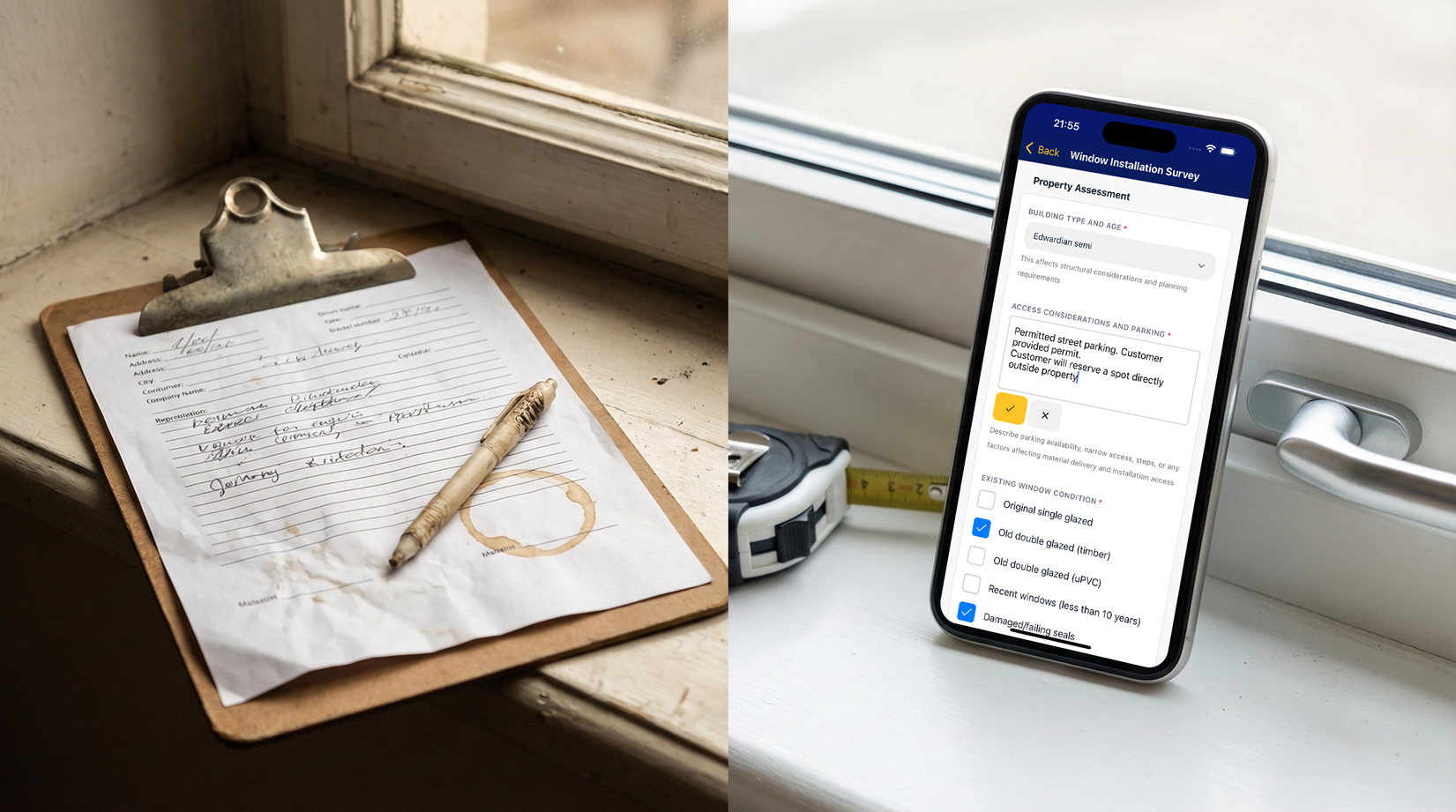
The clipboard survey form has been standard in window fitting for decades. Print a stack, hand them to your fitters, collect them at the end of the day. It works, in the sense that information eventually makes it from the customer's house to your office.
But "eventually" and "works" are doing a lot of heavy lifting. Paper forms create friction at every step - and that friction costs you time, accuracy, and sometimes jobs.
The problems with paper
- Handwriting. Your fitter knows what they wrote. Nobody else does. Critical measurements become guesswork. Customer names get misspelled. Notes are indecipherable. Someone has to call to clarify, or worse, nobody does and the quote goes out wrong.
- Photos are disconnected. Your fitter fills in the form, takes photos on their phone, and now you have two separate things to reunite. Which photos go with which survey? Where's the shot of the existing frame? It's in their camera roll, somewhere between lunch and a screenshot.
- Delay. Paper forms don't reach the office until the fitter does. If they're on site all day, you don't see the survey until evening - or tomorrow. A customer expecting a quick quote waits while paperwork sits in a van.
- Loss. Forms go missing. They fall behind van seats. They get coffee-stained to illegibility. They exist as one physical copy, and if that copy disappears, the information disappears with it.
None of these problems are catastrophic on their own. Together, they create a drag on your operation that you've probably stopped noticing.
What digital forms change
A digital form is just a paper form on a phone - but that shift in medium fixes almost everything.
- Legibility. Typed text is typed text. No interpretation required. Measurements are clear. Customer details are spelled correctly. What your fitter enters is what you see.
- Convenience. Fitters can use voice to text dictation to save time writing
- Photos inline. The form prompts for a photo, the fitter takes it, and it's embedded in the form. No separate camera roll. No reuniting images with paperwork later. The photo of the existing frame is right there next to the measurements.
- Instant availability. Form gets completed on site, syncs to the system, and you can see it from the office immediately. The customer gets their quote the same day because you're not waiting for paper to arrive.
- Attached to the job. The form lives with the job record. Six months later, when someone has a question, you open the job and there's the original survey - photos included. No filing cabinet archaeology.
"What about mobile signal?"
This is the first objection everyone raises. Half your sites have no signal. How does a digital form work when the phone can't connect?
The answer is offline capability. A properly built mobile form works without signal - the fitter completes it, the data saves locally, and it syncs automatically when they have an internet connection. They might not even notice whether they had signal or not.
FitterPal's forms work exactly this way. Fill it in on site, drive away, and by the time your fitter's having lunch somewhere with signal, the form's already in the system.
Beyond surveys: other uses
Once you have digital forms, you find uses beyond the obvious:
- Maintenance checks. A yes/no checklist for warranty visits or annual inspections. Did hinges get adjusted? Drainage clear? Hardware functioning? Completed on site, documented permanently.
- Snagging lists. Remedial visits with photo evidence of each issue addressed. Customer signs off digitally with electronic signature collection. No dispute later about what was or wasn't fixed.
- Site assessments. Access notes, parking situation, any obstacles. Captured once during the survey, visible to whoever does the install weeks later.
- Handover documentation. Completion photos, customer shown how hardware works, any notes for aftercare. Professional, documented, attached to the job forever.
How FitterPal forms work
FitterPal includes a form builder that lets you create exactly what you need. Add questions as text fields, multiline text for longer notes, yes/no toggles for checklists, and photo capture where you need images.
Build a survey form once, use it on every job. Your fitters complete it on their phone - works on the mobile app or web, online or offline. The completed form attaches to the job automatically. You see it immediately. No transcription, no chasing paperwork, no filing.
Different job types can have different forms. Your survey form captures measurements and existing frame condition. Your maintenance form is a checklist. Your handover form documents completion. Each one built to capture exactly what that situation needs.
All questions have nice, big chunky inputs so so it's a doddle completing them.
All questions have nice, big chunky inputs so so it's a doddle completing them.
The clipboard had its time
Paper forms aren't going to sink your business. But they add friction that you don't need - delays, illegibility, disconnected photos, lost information. Every hour spent transcribing or chasing paperwork is an hour not spent on work that grows the business.
Digital forms aren't about being high-tech. They're about information getting from site to office reliably, legibly, and fast. FitterPal makes that straightforward - build the form you need, hand it to your team, and watch the paperwork problem disappear.
Book a demo today where we can show you how our digital forms system could work for you.
Book a demo today where we can show you how our digital forms system could work for you.